
Free Real-Time Stream Viewer for Windows, MacOS and Linux
Published 1 June 2019
Updated 21 March 2026
Installation
Aswan Stream Viewer is a free, open source, cross platform real-time stream viewer written in Python using PyQt5 for the graphical interface. It is part of the tool chest on GitHub.

Aswan Stream Viewer works on Windows, MacOS, and Linux (e.g. Ubuntu, Raspbian, CentOS).
Native Installation
The tool requires the following system packages:
python3- Python 3 interpreterpython3-pip- Python package installergit- Git version control
Once system packages are installed clone the repository and install the application dependencies:
git clone https://github.com/adamlatchem/toolchest.git
cd toolchest/aswan
pip install PyQt5
python3 aswan.py
Container Installation
Aswan Stream Viewer can be run in a container, for example using Podman. This requires access to your X11 socket for GUI display.
Create the following Containerfile.aswan:
FROM ubuntu:24.04

RUN apt-get update && \
    apt-get install -y git python3 python3-pip python3-venv xauth \
        libxkbcommon-x11-0 libxkbcommon0 libegl1 libgl1 libglib2.0-0 \
        libpulse0 libpulse-mainloop-glib0 libasound2t64 libxcb-icccm4 \
        libxcb-image0 libxcb-keysyms1 libxcb-randr0 libxcb-render-util0 \
        libxcb-shape0 libxcb-xinerama0 libxcb-xfixes0 libfontconfig1 \
        libfreetype6 fonts-dejavu-core pulseaudio && \
    rm -rf /var/lib/apt/lists/*

WORKDIR /App

RUN git clone https://github.com/adamlatchem/toolchest.git /App/toolchest

RUN python3 -m venv /opt/venv

ENV PATH="/opt/venv/bin:$PATH"

RUN pip3 install PyQt5

WORKDIR /App/toolchest/aswan

ENTRYPOINT ["python3", "aswan.py"]
Build the Container
podman build --file Containerfile.aswan --tag aswan .Configure X11 Access
Before running the container, you must grant Podman access to your X11 socket and PulseAudio socket for audible alerts.
Option 1: Simple Access (Less Secure) Allow local containers to access the X server:
xhost +local:podmanOption 2: X11 Authentication Cookie (More Secure) Create a container with access to your X11 authentication cookie and PulseAudio:
XSOCK=/tmp/x11-unix
XAUTH=/tmp/xauth.$$
touch $XAUTH
xauth nolist $XAUTH || xauth source - <<< "$(xauth list | grep -v '^!')"
podman run --rm -it \
  --network host \
  --volume $XSOCK:/tmp/.X11-unix:rw \
  --volume $XAUTH:/tmp/.Xauthority \
  --volume /run/user/1000/pulse:/run/user/1000/pulse:ro \
  --env DISPLAY \
  --env XAUTHORITY=/tmp/.Xauthority \
  --env PULSE_SERVER=unix:/run/user/1000/pulse/native \
  aswan:latest
Run the Container
Basic run command (includes PulseAudio for audible alerts):
podman run --rm -it \
  --network host \
  --volume /tmp/.X11-unix:/tmp/.X11-unix:rw \
  --volume /run/user/1000/pulse:/run/user/1000/pulse:ro \
  --env DISPLAY \
  --env PULSE_SERVER=unix:/run/user/1000/pulse/native \
  aswan:latest
Run with File Input
To monitor a log file in real-time:
tail -f /var/log/syslog | podman run --rm -i \
  --network host \
  --volume /tmp/.X11-unix:/tmp/.X11-unix:rw \
  --volume /run/user/1000/pulse:/run/user/1000/pulse:ro \
  --env DISPLAY \
  --env PULSE_SERVER=unix:/run/user/1000/pulse/native \
  aswan:latest
Features
Aswan Stream Viewer provides a powerful GUI for monitoring and analyzing data streams in real-time.
The application processes byte streams containing records with fields, providing:
- Real-time monitoring - Watch streaming data as it arrives
- Flexible input - Read from stdin or files
- Tabular display - Convert stream records to sortable tables
- Aggregation - Group and summarize data with key metadata
- Audible alerts - Optional sound notification when new data arrives
- Filtering - Sort and filter the view to focus on what matters
- Column configuration - Customize which columns are displayed
As a desktop application, Aswan Stream Viewer is entirely local to your device. Your data is not shared with any online service. This is useful for secure environments and offline work.
How to Use
Start Aswan Stream Viewer to see the main window. The application accepts streaming data through stdin or from files.
Input Methods
Stdin Input
Pipe data directly into Aswan:
tail -f /var/log/syslog | aswanFile Input
Monitor a growing log file:
tail -f /var/log/application.log | aswanInterface Overview
The main window consists of:
- Menu Bar - Access commands and configuration
- Tree View - Display aggregated data in sortable columns
- Status Bar - Show connection and processing status
Menu Commands
- File > Open - Open a file for monitoring
- View > Columns - Configure displayed columns
- View > Clear - Clear the current report
- View > Fit Columns - Auto-size columns to content
- Realtime - Toggle real-time update mode
- Audible Blink - Enable sound on new data
- Help > Documentation - Open documentation in browser
- Quit - Exit the application
Column Configuration
Click View > Columns to configure the tabulator. The tabulator defines how raw stream bytes are parsed into columns:
- Add, remove, or reorder columns
- Set column widths
- Define field separators
- Configure data type parsing
Real-time Updates
When Realtime mode is enabled, the view updates automatically as new data arrives. Enable Audible Blink to hear a notification sound when new records are processed.
Design
Aswan Stream Viewer uses a compact design following the MVVM design pattern. The architecture consists of several key components:
Core Components
- Tabulator - Converts raw byte streams to table format
- Aggregator - Groups records and calculates summaries
- Report - Manages the data model for display
- MainWindow - Provides the PyQt5 GUI interface
Data Flow
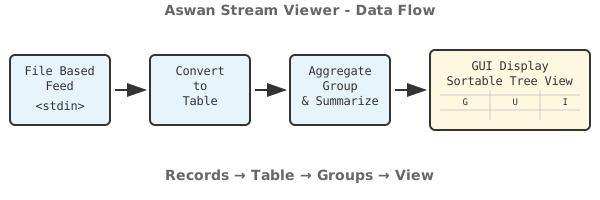
The data flow shows how records are processed:
- File Based Feed - Read from stdin or files
- Convert to Table - Parse records into tabular format
- Aggregate - Group records by key metadata
- GUI Display - View results in sortable tree view
The Tabulator reads records from the input stream and converts each record to a table row with named columns. The Aggregator processes these rows, grouping by key metadata fields. The Report maintains the aggregated data, and the MainWindow displays it in a sortable tree view.
Technology
- Python 3 - Cross-platform programming language
- PyQt5 - Qt framework for GUI development
- Qt Model/View - MVC architecture for data display
The use of Python with PyQt5 ensures the application is cross-platform with native look and feel on each operating system. The project is Open Source allowing users to extend the functionality or adapt it for their needs.
Use Cases
Aswan Stream Viewer is useful for:
- Development - Monitor application logs during debugging
- Debugging - Watch real-time output from command-line tools
- System Administration - Monitor system logs and events
- DevOps - Analyze streaming data from applications
- Testing - Observe application behavior during test runs
PyQt5
GUI


